Aphra / AI calendar assistant
AI calendar assistant
An AI calendar assistant manages your diary when you ask in plain words. With Aphra you ask what is on, add, move or cancel an event, or photograph a poster or letter and check the dates it finds. Every change is shown to you before it happens.
Try it free, typed or spoken, no sign-up. iPhone version coming soon. Email me when it is live.
How do you use it?
- Ask in your own words. "What have I got on tomorrow?" "Put the school meeting in my calendar for Thursday at four." "Move lunch to one."
- See the change first. Aphra shows you what it is about to do, and you approve it.
- It comes back. Reminders and events return at the moment they matter, with the next step ready to tap.
Can it add an event from a photo?
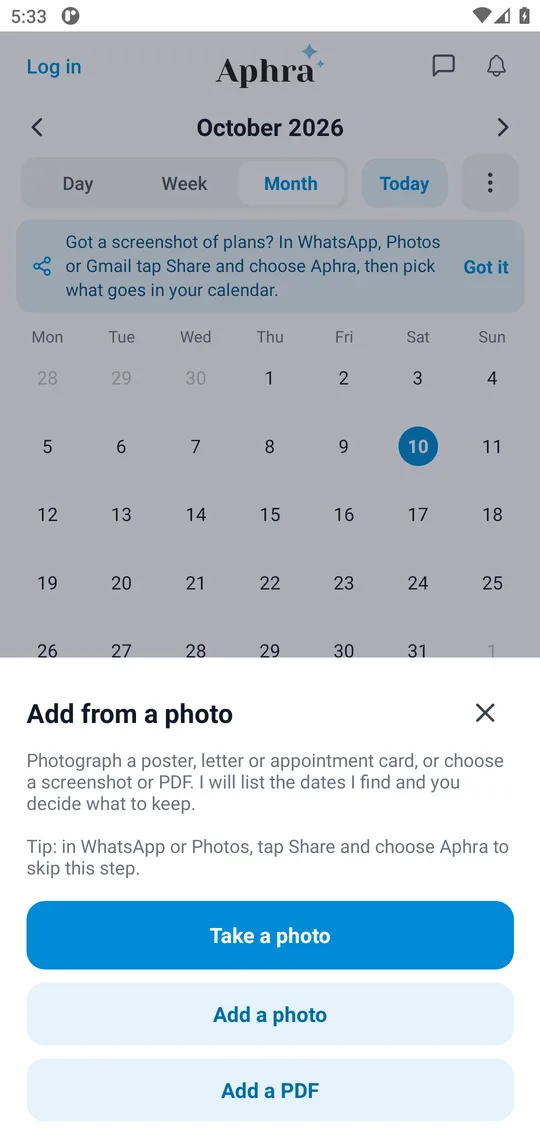
Yes. In Calendar, tap the + beside the message box, then take a photo, add a photo or add a PDF. A poster, an appointment card, a school letter or a screenshot from WhatsApp all work. Aphra lists the dates it finds, marks anything it is unsure about, and nothing is added until you say so. On Android you can also share a screenshot straight to Aphra from WhatsApp, Photos or Gmail.
Can it arrange a meeting for me?
Tell Aphra who to meet. It drafts the message and emails them only after you tap Send, then books the time they pick and can add a video-call link to the event with one tap. You can see and stop everything in Meetings.
An AI calendar assistant compared with a calendar app
| Option | You do | Good for |
|---|---|---|
| A calendar app on its own | Open it, tap through, enter every detail | Seeing your week at a glance |
| Siri or a voice assistant | Phrase it the way it expects | One quick event |
| AI calendar assistant (Aphra) | Say what you want, check the change, approve | Adding and moving things without opening the grid |
What it will not do
Aphra does not change your calendar without your approval. Outlook calendar works today; Google Calendar isComing soon. You choose what to connect and can disconnect at any time. See theprivacy policy.
Questions people ask
- What is an AI calendar assistant?
- An assistant that handles your diary when you ask in plain words: what is on, add an event, move it or cancel it. Aphra shows you each change before it happens.
- Which calendars does Aphra work with?
- Outlook calendar works today. Google Calendar is coming soon, pending Google's approval.
- Can it add an event from a photo?
- Yes. Tap the + beside the message box in Calendar, then take a photo, add a photo or add a PDF of a poster, a letter or a screenshot. Aphra finds the dates and shows them for you to check before anything is added.
- Will it change my calendar on its own?
- No. Aphra shows you the change first and only acts when you approve it.
- Can it arrange a meeting with someone?
- Yes. Tell Aphra who to meet. When you approve it, Aphra emails them to find a time and can add a video-call link to the event.
- Can I use my voice?
- Yes. Use the microphone in Calendar, or talk hands-free in Voice. You can also type.
What people said
★★★★★
This is one of the best personal assistant app I have used. It’s become my habit to use Aphra daily for both personal and professional work. Loved it!
Anjum Araa, Co-Founder
★★★★★
A game changer. This will change my life
Ginny, Operations Manager
★★★★★
The best AI assistant so far. A one window solution to most of the daily operations of my life, Aphra have been a great help
MTalha, Product Manager
★★★★★
Finally. I’ve been waiting for something like this for ages!
EveryNick, Marketer
Five-star Google Play reviews of an earlier version of the app.
Hand your first job over
Try it free, typed or spoken, no sign-up. iPhone version coming soon. Email me when it is live.