Aphra / WhatsApp message writer
WhatsApp message writer
A WhatsApp message writer drafts the message from a few words. With Aphra you say what you want to tell someone and it writes the WhatsApp in your own voice. You change the tone with one tap, then open it in WhatsApp and tap Send yourself.
Try it free, typed or spoken, no sign-up. Email me when it is live.
How does it work?
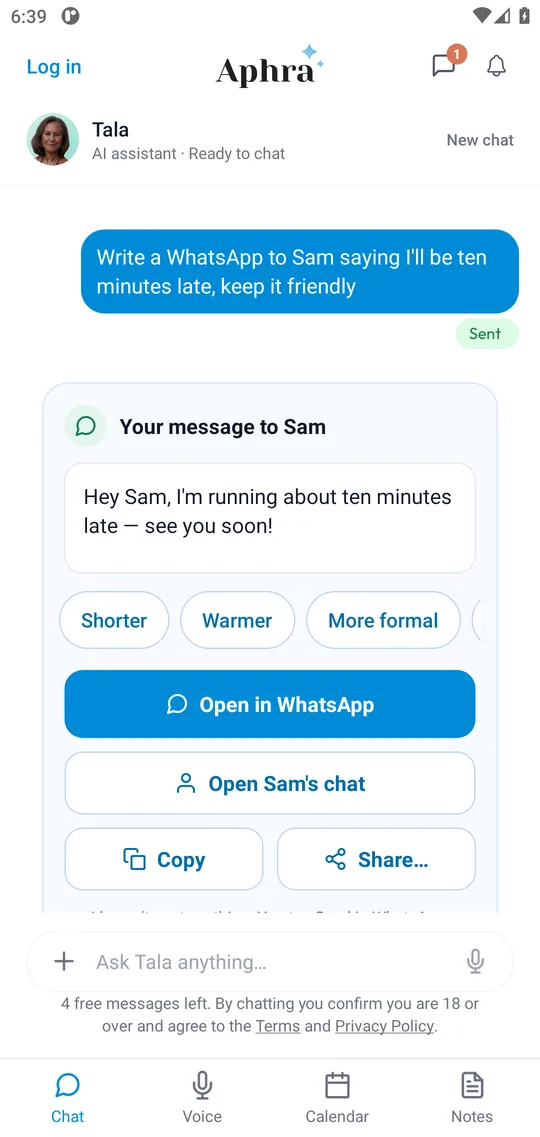
- Say it once. "Write a WhatsApp to Sam saying I'll be ten minutes late, keep it friendly."
- Check the draft. It appears as a card in your own voice. Tap Shorter, Warmer or More formal, or edit it.
- Open it in WhatsApp. Aphra opens WhatsApp with the message ready, or opens Sam's chat if you allow it to look in your contacts. You tap Send.
How does it find the right person?
Tap "Open Sam's chat" and, with your permission, Aphra looks the name up in your phone's contacts. If there are two Sams it asks which one. It can also remember a nickname, such as Paddy for Patrick. Your contacts stay on your phone. If you would rather not allow it, choose the person inside WhatsApp instead.
A WhatsApp message writer compared with writing it yourself
| Option | You do | Good for |
|---|---|---|
| Typing it yourself | Find the words and the right chat | Short, easy messages |
| Dictating into WhatsApp | Say every word as you want it sent | When you already know the wording |
| WhatsApp message writer (Aphra) | Say what you mean; pick a tone; tap Send | Awkward, polite or hard-to-word messages |
What it will not do
Aphra never sends anything on its own: you tap Send in WhatsApp. It does not connect to your WhatsApp account or read your chats. You choose what to connect and can disconnect at any time. See theprivacy policy.
Questions people ask
- What is a WhatsApp message writer?
- A tool that drafts a message for you from a few words. With Aphra you say what you want to tell someone and it writes the WhatsApp in your own voice.
- Does Aphra send the message?
- No. Aphra prepares it and hands it to WhatsApp. You check it and tap Send there.
- Can I change the tone?
- Yes, with one tap: shorter, warmer, more formal, or try another version. You can also edit the words.
- Can it open the right person's chat?
- Yes. If you allow it, Aphra looks the person up in your phone's contacts and opens their chat. Your contacts stay on your phone. If you would rather not, you choose the person in WhatsApp.
- Does Aphra read my WhatsApp chats?
- No. Aphra does not connect to your WhatsApp account or read your conversations. It only writes the message you ask for.
- Does it only do WhatsApp?
- No. Ask for a text or an email and Aphra drafts those too. You can also copy the message or share it to another app.
What people said
★★★★★
This is one of the best personal assistant app I have used. It’s become my habit to use Aphra daily for both personal and professional work. Loved it!
Anjum Araa, Co-Founder
★★★★★
A game changer. This will change my life
Ginny, Operations Manager
★★★★★
The best AI assistant so far. A one window solution to most of the daily operations of my life, Aphra have been a great help
MTalha, Product Manager
★★★★★
Finally. I’ve been waiting for something like this for ages!
EveryNick, Marketer
Five-star Google Play reviews of an earlier version of the app.
Hand your first job over
Try it free, typed or spoken, no sign-up. Email me when it is live.