Aphra / AI note taking app
AI note taking app
An AI note taking app saves what you tell it so you do not have to file it yourself. With Aphra you say or type a note once, turn a photo or a PDF into a note, and ask for a reminder on any note when it needs one.
Try it free, typed or spoken, no sign-up. Email me when it is live.
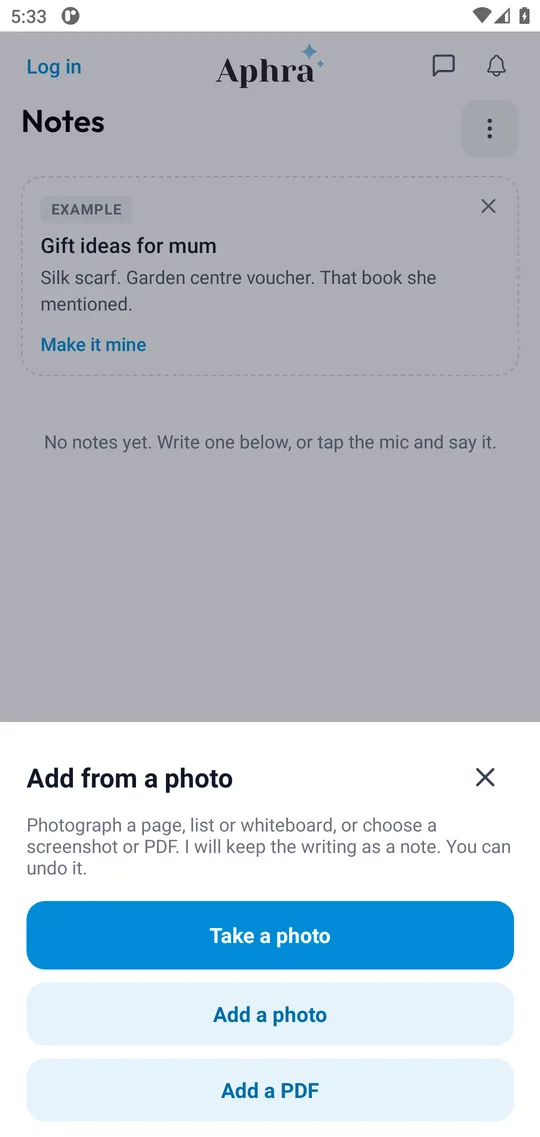
How do you take a note with Aphra?
- Say it or type it once. "Note that the boiler service is due in March." No folders, no titles to invent.
- It is received. Your assistant answers straight away, so you can drop the thought.
- Find it again by asking. Notes are kept in your Notes tab, and you can search them or ask Aphra about them.
Can a photo of a page or a list become a note?
Yes. In Notes, tap the + beside the message box, then take a photo, add a photo or add a PDF. A page, a list on paper or a screenshot all work. Aphra keeps the writing as a note, and you can undo it. If it cannot read the picture it says so plainly and tells you what to try, such as better light or a closer shot.
What about reminders?
A note stays a note until you decide otherwise. Each note has a "Remind me?" button, so Aphra only sets a reminder when you ask. When it does, it comes back at the moment it matters with the next step ready to tap.
An AI note taking app compared with other ways of keeping notes
| Option | You do | Good for |
|---|---|---|
| Paper or a notebook | Everything, and remember to look | Thinking on paper |
| A notes app you type into | Capturing, titling and revisiting | Long writing and documents |
| Voice memos | Listening back | Capturing a thought quickly |
| AI note taking app (Aphra) | Say it once; ask for a reminder if you want one | Short notes and lists you keep losing |
What it will not do
Aphra is built for short notes and lists, not for long documents or shared team workspaces. It does not send or change anything without your approval. You choose what to connect and can disconnect at any time. See theprivacy policy.
Questions people ask
- What is an AI note taking app?
- An app where you say or type a note once and the assistant keeps it for you, instead of you filing it. With Aphra the note is saved, you can find it again by asking, and you can turn it into a reminder with one tap.
- Can I add a note by voice?
- Yes. Tap the microphone in Notes or talk to Aphra in Voice, and say it once. You can also type it.
- Can I turn a photo or a PDF into a note?
- Yes. Tap the + beside the message box in Notes, then take a photo, add a photo or add a PDF. Aphra keeps the writing as a note, and you can undo it.
- Does it set a reminder from a note?
- You choose. Each note has a "Remind me?" button, so a reminder is only set when you ask for one.
- Do I need an account to try it?
- No. You can try Aphra free, typed or spoken, with no sign-up. Create an account to keep what you have saved on other devices.
What people said
★★★★★
This is one of the best personal assistant app I have used. It’s become my habit to use Aphra daily for both personal and professional work. Loved it!
Anjum Araa, Co-Founder
★★★★★
A game changer. This will change my life
Ginny, Operations Manager
★★★★★
The best AI assistant so far. A one window solution to most of the daily operations of my life, Aphra have been a great help
MTalha, Product Manager
★★★★★
Finally. I’ve been waiting for something like this for ages!
EveryNick, Marketer
Five-star Google Play reviews of an earlier version of the app.
Hand your first job over
Try it free, typed or spoken, no sign-up. Email me when it is live.